Launching your freelance business feels amazing.
No more boss.
No more rules.
Nobody forcing you to work on something you have no interest in.
No one time tracking your every move.
That flexibility and autonomy is something you’ve dreamed about for years right?
But there’s a downside if you take that idea of freedom too far. Deadlines can slip if you ignore timelines, or worse, push yourself too hard and you risk burnout.
Freelancing is a great way to earn a living, but keep in mind many new freelancers fail to earn a living wage in their first year.
And when you dig into why, one theme does come up time and time again.
New freelancers aren’t very good at time tracking.
Why do freelancers fail at time tracking?
Most fail because they go with old school manual methods and people make mistakes, they forget about their non-billable admin time, and they don’t track their working time close enough to charge the right price.
The fix is to make use of automated tools – like Clockify or Toggl – and simple focus systems like the Pomodoro method.
I’m not saying new freelancers don’t think about time tracking. They just don’t know how to go about it.
It feels like a major headache – not at all what they signed up for.
I get it.
I’ve been there.
The good news?
There are simple tools and methods you can start using today to get better at time management.
Tracking your time more closely will allow you to operate a professional, profitable, and productive freelance business.
Ready to learn why most freelancers struggle with time tracking – and how you can avoid the pitfalls?
Let’s take a closer look.
Why Manual Time Tracking Doesn’t Work for Freelancers
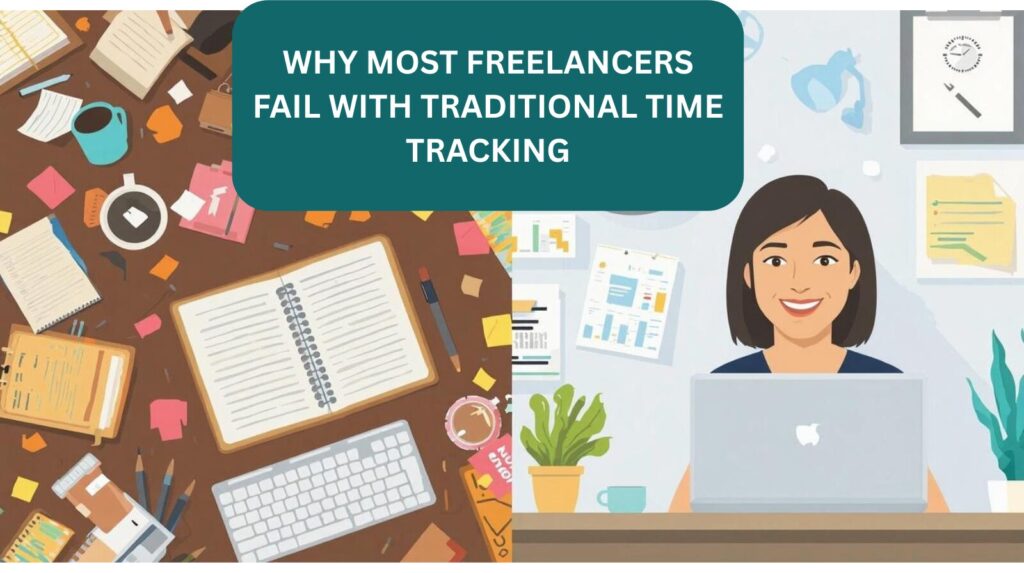
If you asked me in my first year as a freelancer what I thought about tracking my time, I probably would have looked at you like you were an alien.
Why would I track my time?
Win a client, get a project, complete it, get paid. Simple right?
If only it WAS that simple.
If you don’t track your time, how do you know what to charge? You’ll almost always leave money on the table.
The Problem With Manual Time Tracking
After a few months of freelancing, I started to get a sense that I was leaving money on the table by not properly tracking my time.
No problem – I started recording times in a notebook and transferring them to a spreadsheet later.
Simple right?
Wrong.
Half the time I’d forget to do it, and my times never seemed to add up.
I’d be willing to bet a lot of new freelancers share this same experience – the ones I talk to sure do.
These systems are prone to human error.
Sure you can use a timer on your phone, but what happens when you forget to start that timer? What happens when you get distracted and spend 15 minutes looking at kitten videos instead of client work?
At best, manual time tracking gives you a loose guestimate of what you should be billing your client.
It’s better than nothing, but it won’t give you a clear picture.
Let me shout this from the rafters: you’ll be leaving money on the table!
How Your Mindset Can Kill Your Productivity
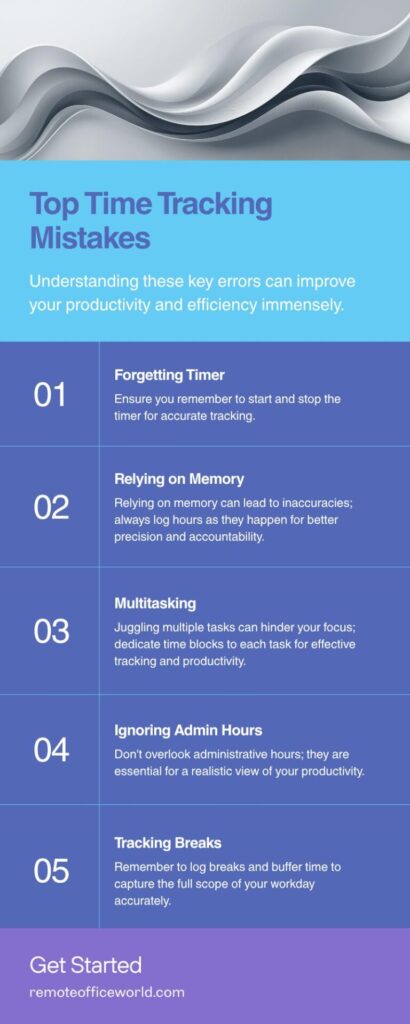
Let’s say you’re great at hitting that timer – every time, no exceptions.
No need for any other tools or methods, right? You’ve got this time tracking thing nailed.
Well, probably not.
Even if you’re great at hitting start on that timer before starting any client work, there’s a good chance your mindset is getting in your way.
Here are some common examples of how our own habits crush our productivity:
- The Myth of Multitasking: If I won the lottery every time I heard someone tell me how great they are at multitasking, I’d never have to work another day in my life. Multitasking is a myth. Nobody can concentrate on more than one task at a time, and every time you switch your focus, your productivity tanks. It can take more than 20 minutes to get back on task – and it’s almost impossible to accurately track your time when you’re “multitasking.”
- The Procrastination Hurdle: When a big project is sitting on your schedule, it can feel overwhelming. Just a few minutes doom scrolling right? Knowing there’s a timer running in the background helps prevent that mindset from taking hold. When you’re under the clock, you tend to focus more, get distracted less, and that makes you more productive overall.
- Anxiety and Worry: Will you be able to finish the job? Will the client like it when you do? These are common questions. You can learn more ways to sharpen your focus and improve productivity in The Complete Guide to Freelancer Productivty. Stressing out over little details is a common problem among freelancers. Strengthening your mindset – being more willing to chalk a mistake up as an opportunity to learn – is a good first step in getting past that anxiety.
Should Freelancers Track Non-Billable Hours?
Yes – and this is one of the biggest mistakes I see freelancers make.
One of the great things about being a freelancer for more than a decade is that I’ve had a lot of time to make mistakes and learn from them.
Bonus for you!
I can help you avoid making the same ones.
One big thing I’ve discovered? Freelancers (Guilty as charged!) tend to undervalue their time even when they consciously track it.
Sure we track the time we’re writing, designing, drawing, or building. But we forget about the other client-related activities.
Don’t Let Admin Tasks Fall Through The Cracks
If I could tell you to change one thing about your freelance business right now that would make you a ton more money, it would be this: start accounting for non-billable hours.
It’s fairly easy to track those billable hours spent on your core work – writing for clients in my case. But what about all the time you spend on marketing, administration, and client communication?
Your time isn’t free.
For every client you take on, there will be administrative costs. Drawing up contracts, sending invoices, setting up payment methods – these all take time.
Track every second you spend on your business. Eventually, it becomes second nature, and you can adjust your rates to reflect the time spent on this side of your business as well.
Make Sure to Include Breaks and Buffer Time
Let’s go back to 2014 for a moment. I’m a new freelancer, I have 5 projects on the go – I’m cooking! I’ll be Six figures in no time right?
Nope!
Within 3 months I was overwhelmed, burnt out, and ready to walk away.
You can’t sustain a non-stop pace as a freelancer.
If you ignore this rule you’ll find yourself dealing with mental fatigue, difficulty concentrating, and you WILL make mistakes.
Here’s how you fix it:
- Time your sessions using methods such as the Pomodoro Technique (more on that below). Remember to pause your client time tracking during breaks – your client gets your best work, gets billed fairly and you run less risk of burnout.
- Build buffer time in your day. Unexpected things happen almost every day. When you’re setting aside time for a project, build in room to handle unplanned interruptions with minimal impact on your overall timeline.
How to Use Time Tracking to Earn More Money As A Freelancer
Let’s be real.
Time tracking isn’t about accountability for its own sake.
You want to track your time so you can charge the right rates and make more money.
It’s all about financial growth and sustainability.
When you reach out to old clients and want to justify higher rates, being able to explain the demands on your time is the most important tool in your toolbox.
If you discover that a client is undervaluing your services and they aren’t willing to adjust – it’s time to find better clients.
Should Freelancers Charge Flat Rates or Hourly?
Flat rate, full stop.
I’ve yet to meet a freelancer out there that’s killing it charging by the hour. Hourly work feels like the same old trap as the corporate grind – you hustle away and never quite reach your potential.
Just because you power through a 1000-word draft article in 30 minutes, does that mean you should only be paid for 30 minutes of work?
Absolutely not.
You shouldn’t be punished for being good at what you do.
A good writer, designer, or artist might be able to complete three top-quality projects in the time it takes a novice to complete one. They should not be paid the same hourly rate.
But before you can make that move to flat rate billing, you need a solid understanding of wher yor time actually goes. Otherwise, you’ll continue charging less than your value.
Start with hourly work, tracking your time as you go through each project. Once you truly understand how you spend your time as a freelancer, you can make the switch to fixed- rate billing with confidence.
Track everything – every sub-task.
For example, as a video creator you might track time spent on script writing, editing, researching, finding b-roll, and publishing. You need to know how long each step takes before you can bill clients properly.
For more on this, check out episode 13 of The Freelance Insider Show: How to Scale Your Freelance Business.
Use Your Time Tracking Data to Build True Profitability
Once you have a clear picture of how you spend your time, you can make better finanacial decisions. It Specifically, it allows you to do three core things that can take you from a struggling freelancer to a successful one:
- Choose The Right Clients: Before I started tracking my time closely, I had a vague sense that some clients where sucking up too much of it – without paying me any more for the extra effort. When you track your time properly, those clients become obvious. Just because a rate sounds good doesn’t mean you’re actually making money when you factor in how demanding that client is. Learn more about building stronger client relationships in episode 12: Building Longterm Freelance Client Relationships.
- Make Better Decisions: When you understand how you’re spending your time with each client, you can decide whether it’s worth continuing that relationship – or negotiating a higher rate to make it worth your while.
- Eliminate Guess Work: Never guess how long a project will take. Within your first few freelance projects, you’ll start to get a feel for how different types of of work break down. That allows you to quote accurately. factor in revisions, and build meeting time into every project timeline.
The Best Time Tracking Tools and Techniques for Freelancers
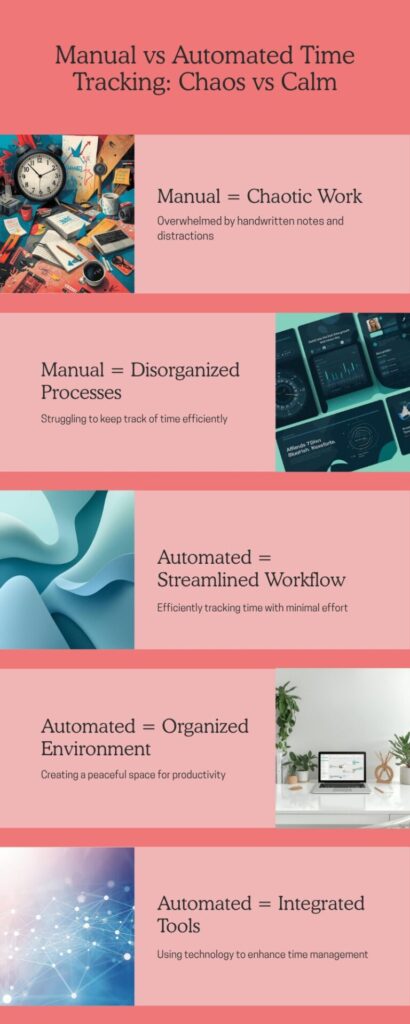
At this point you’re probably thinking, okay I’m sold!
I need to stop relying on manual methods and start using something better
So what does that look like?
What is The Best Time Tracking App for Freelancers?
My first few attempts at time tracking were an absolute failure.
I’d heard about the Pomodoro Technique, so I figured I’d set a timer on my phone, get to work, and record each session in a Google Sheets doc.
Not so easy.
I kept forgetting to start the timer, or I’d forget to record my sessions until later in the evening – then I’d worry if I was even remembering correctly.
If that sounds familiar, it’s time to consider an automation tool.
There are dozens of options out there, but here are three I’d put at the top of the list:
- Clockify — Best overall. Great free version, detailed reports, and easy to integrate int a daily workflow.
- Harvest — Easy to use, works across desktop and mobile, solid reporting.
- Toggl Track — Simple interface, one click timers, and arguably the best free plan available.
How Do Freelancers Use the Pomodoro Technique?
The Pomodoro Technique is a time managagment method where you work in focused intervals – typically 25 minutes – followed by a short break.
After a few cycles you take a longer break (around 30 minutes).
Here’s how I use it: as I Write this, there are 20 minutes left on the 40-minute timer I set. Through trial and error, I’ve found 40 minutes works better for me thant the standard 25, followed by a 5-minute break.
You can adjust the intervals until you find what you’re comfortable with – though I wouldn’t go much beyond 45 minutes. It gets hard to stay focused longer than that in one session.
Never skip the break at the end of your session. That’s the whole point.
Building a Time Tracking System That Actually Sticks
Choosing a good tool is only half the battle. You still need structure around it.
Here’s what I do every day:
- Integrate Time Tracking into Your Workflow: I launch Clockify at the start of every day, before I do any client work. Over time it becomes second nature – just like brushing your teeth or walking the dog. At that point it doesn’t feel annoying; it’s just something you do.
- Assign Blocks of Time for Tasks: At the end of every week I build my schedule for the next week in Trello. I create time blocks for specific tasks – 40 minutes for a client draft, 30 minutes for a video call, and so on. Complete one block before moving on to the next. No jumping between tasks.
- Use The Pomodoro Technique: Set a timer, work in focused intervals, take your breaks. Simple system, massive impact.
Shifting Boundaries as a Freelancer (And Why It Matters for Time Tracking)
We’ve touched on mindset and boundaries, but if you ever want to operate like a true professional, you have to place extra focus here.
If you spend too little time on your freelance business, you won’t make any traction. Too much, and you’ll burn out.
When you find the balance – and hold it – your business reaches heights you never thought possible.
By setting firm work boundaries you can:
- Achieve True balance: As a solopreneur it’s easy to become a workaholic. That’s not good for you, your family, or your clients. Strict boundaries between work and personal time lead to better productivity and a better life.
- Create Minimum Targets for Hours Worked: Some freelancers fail,because they’re not spending enough time on their business. Track your time to make sure you’re always hitting your minimums – without drifting too far into overtime.
- Avoid Client Communication Problems: When clients know upfront when you’re availabe, when you’ll answer emails, and how long you’ll take to respond, there are fewer misunderstandings. That means happier clients and more repeat business.
How Saying “No” Fits Into Your Time Tracking Framework
One thing I learned quickly once I had a better handle on my time – I couldn’t say yes to every project.
Not because I didn’t like the client. Because I couldn’t fit it into my schedule.
Taking on too much leads to burnout, your productivity suffers, and, eventually you may lose good clients because you’re not producing your best work.
With better time tracking, you’ll know when to start scaling back.
Here are three tips to help you say no right away:
- Listen to Your Gut: As you get better at tracking your time, it becomes more valuable to you. You’ll start to develop a kind of “spidey sense” when something doesn’t feel right. Trust it.
- Decline Strategically: You never want to burn bridges. Don’t be afraid to say no to projects that don’t feel like a good fit, but leave the door open. If a timeline feels unrealistic, tell the client. Let them know you’ll circle back once the crunch is over.
- Choose Work That Matches Your Strengths: Generalists tend to struggle. Niche down. Don’t apply for anything and everything. If a project doesn’t match your work experience, life experience, or personality – walk away.
Frequently Asked Questions About Time Tracking for Freelancers
Why do most freelancers fail at time tracking?
Most freelancers fail because they rely on methods that are too easy to forget or fudge, don’t track non-billable admin time, and don’t break projects down into enough detail to price them accurately. The result is undercharging and leaving money on the table.
What is the best time tracking app for freelancers?
Clockify is the best overall option – it has a strong free plan, detailed reporting, and is easy to build into a daily routine. Toggl Track is worth considering if you want the simplest possible interface. Harvest is a solid choice if you work across multiple devices.
Should freelancers track non-billable hours?
Yes, absolutely. Admin tasks like writing contracts, sending invoices, and answering client emails all take time. If you don’t track them, you can’t factor them into your rates. Track every hour you spend on your business, not just the time spent on deliverables.
Should freelancers charge flat rates of hourly?
Flat rates almost always win. Hourly billing penalizes you for being fast and experienced. Once you’ve tracked enough projects to understand how you spend your time, flat rate billing lets you price your expertise – not your hours.
How does the Pomodoro Technique work for freelancers?
You work in focused intervals – typicall 25 to 40 minutes – then take a short break. The timer creates a sense of urgency that reduces procrastination and makes it easier to avoid distractions. Never skip the break at the end of the session.
How does time tracking help freelancers earn more money?
When you know eactly gow long every type of project takes, you can price accurately, identify time-consuming clientss woh aren’t paying enough, and make the transition from hourly to flat-rate billing – which is where the real income growth happens.
Start Time Tracking and Start Making More Money as a Freelancer
Now that you’re ready to become a time tracking pro, there’s no reason you can’t make it as a freelancer.
You can have that flexible life you’ve always dreamed about. Walk away from the 9 to 5.
But that means consistent time tracking, a clear understanding of how you spend your time, and the discipline to know where you can do better.
As you build those habits, you’ll leave the chaos behind, become a highly focused freelance machine, and find a work-life balance that actually works.
Clients will see you as trustworthy and reliable. Your family will know that when you say you’re switching off the laptop you really will.
Start today.
Pick a time tracking app – Clockify, Harvest, or Toggle – and try it for a month. If it doesn’t feel like a great fit try another.
It won’t take long to find a routine that works for you.
And that’s when your freelance business will really start to take off.
Feel free to reach out and let me know how your time tracking journey is going.